How to Get Your Online Store Ready for Valentine’s Sales 💞
Valentine’s Day is one of the few times in the year when people don’t need to be convinced to buy; they want to. They’re already thinking about gifts, surprises, and thoughtful gestures for their partners, friends, situationships, and even themselves.
For business owners, this is good news. However, high demand doesn’t always translate to high sales.
If everything is happening in your DMs — “How much?” “Is this still available?” “Where’s your account number?” — it’s very easy to get overwhelmed, reply late, mix up orders, and lose customers who were ready to pay.
That’s where having an online store makes all the difference.
In this article, we’ll show you how to get your store Valentine-ready with Catlog, so when the love rush starts, your business is ready to keep up.
Why an online store matters for Valentine's Day
When Valentine's rush starts, everything speeds up: people are emotional, in a hurry, and making decisions quickly. If they have to wait for you to reply to a DM, ask for prices, confirm availability, and then request your account details, most of them will drop off. They'll buy from someone else who made it easier.
An online store changes that completely.
Instead of answering the same questions over and over, you can send one link where people can:
- Browse all your Valentine's Day offers at once
- See prices, product details and availability instantly
- Place an order and pay immediately, even at 2 am when you're asleep
Catlog makes this especially easy if you sell through social media — Instagram, WhatsApp and more — by giving you a simple online store link to send people when they’re ready to buy.

How to Get Your Online Store Ready for Valentine's Day With Catlog (7 Steps)
For Valentine, your store should work like this: customer clicks your link, sees exactly what they want, adds it to cart, and pays instantly. No back-and-forth.
Here's how to have smooth sales in 7 steps:
Step 1: Create Valentine's-themed product bundles
People love convenience and ready-made solutions during the Valentine's season.
Instead of making customers browse your entire products and pick individual items, you can bundle your products into ready-made gift sets.
Some bundle examples that work:
- If you sell skincare, create a:
- "Pamper Your Love Bundle" – cleanser + face mask + body butter
- "Self-Love Spa Kit" – for people treating themselves
2. If you sell food/snacks:
- "Date Night In Box" – wine + chocolate + cookies
- "Sweet Treats Bundle" – assorted chocolates and pastries
3. If you sell fashion/accessories:
- "His & Hers Matching Set" – coordinated pieces for couples
- "Galentine's Gift Box" – for friends celebrating together
Pro tip: Give your bundles romantic, emotion-driven names. "You're Everything to Me Gift Set" would sell more than a generic name like "Premium Bundle".
Set up your Valentine's bundles on Catlog now
Step 2: Update your product photos and descriptions (and make them feel like love)
Your product images should match the Valentine's vibe. Add hearts, red and pink tones, or romantic props to your photos. You can use simple Canva templates to add Valentine’s overlays to your product photos in minutes, then download them.
Then, rewrite your product descriptions to speak to the emotion of the season. Instead of just listing features, talk about the experience:
Instead of: "Premium body butter, 200ml, shea butter formula"
Write: "Treat them to the luxury they can feel. Our whipped body butter melts into skin like silk—perfect for a romantic massage or post-shower pampering. Because they deserve to feel special."
Instead of: "Chocolate assortment box, 12 pieces"
Write: "Say it with chocolate. 12 handpicked pieces that melt in the mouth—from dark and mysterious to sweet and surprising. For the person who makes your heart skip."
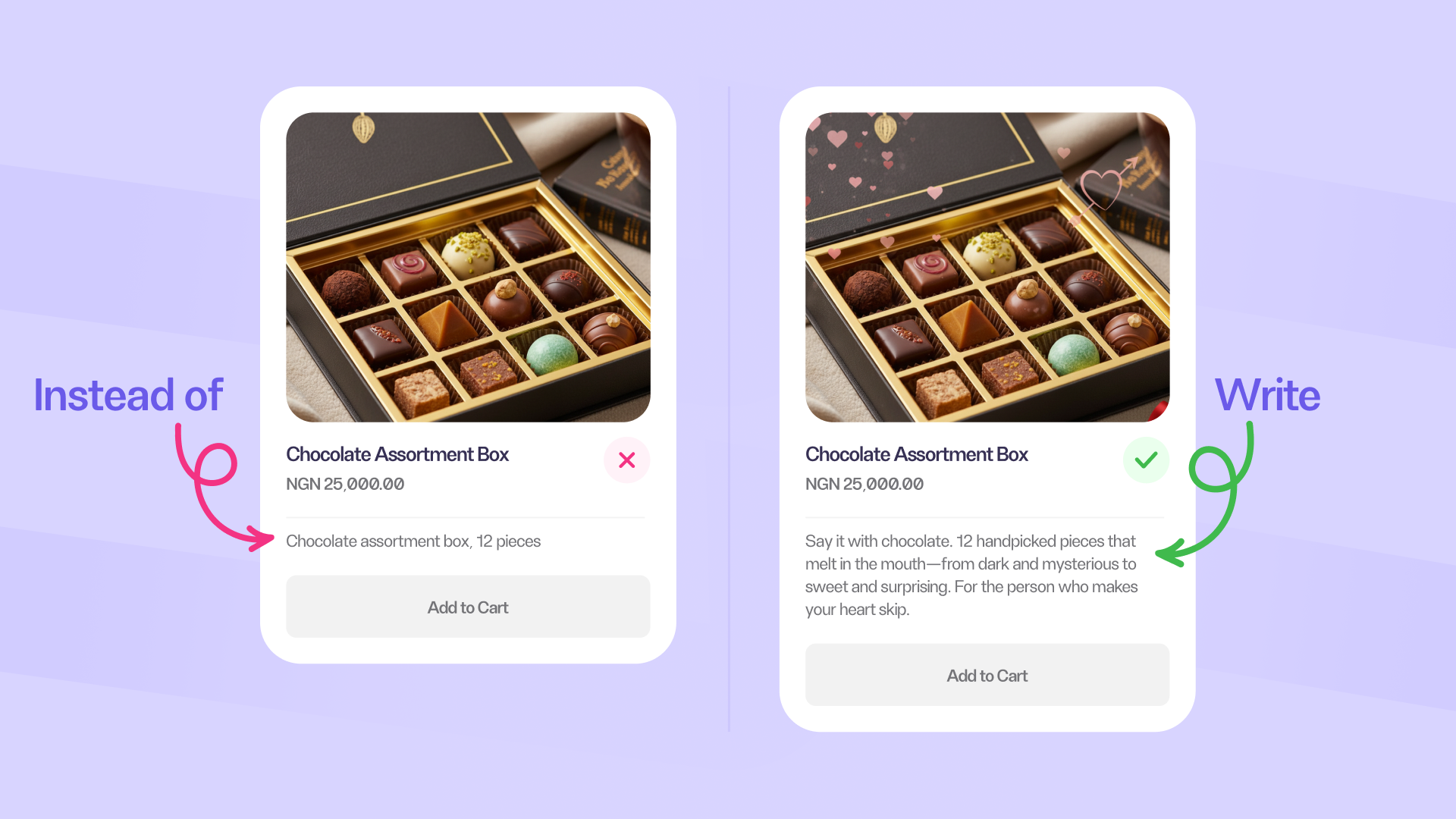
See the difference? You're selling the experience, not just the product.
Once you post your Valentine offers on Instagram, you can skip the manual upload for your online store. Use Catlog’s Instagram Import to automatically upload the products into your store. Catlog’s AI pulls the images, descriptions, prices, everything. The best part? It takes less than 5 minutes instead of re-uploading manually.
Step 3: Create limited-time Valentine offers
Nothing drives urgency like a deadline. Create special Valentine's discounts that expire before February 14th, or offer early-bird pricing for customers who order before a certain date.
With Catlog, you can add discount codes, create coupons, or special pricing directly to your store, and customers can apply them at checkout without needing to DM you for clarification.
Two ways to add discounts on Catlog:
- Manual Discounts
How it works:
- Open the Catlog app.
- Click Quick Actions > Create Coupons.
- Enter your discount label (e.g., Valentine2026).
- Set your discount percentage, maximum value, duration, and save.
2. Auto Cart Discount
This feature automatically applies discounts when customers meet conditions, like minimum spend or specific product purchases.
How it works:
- Go to Store Settings > Checkout Options > Auto Cart Discount
- Set your preferred trigger (e.g., minimum cart amount of ₦100,000).
- Once the conditions are met, the discount is applied automatically.

Step 4: Make it easy for customers to complete checkout
The easier it is to shop, the more sales you'll make. Add clear delivery and pickup details to your store so customers can complete their purchase in just a few clicks.
Catlog's checkout is designed to be fast and mobile-friendly, which is essential since most Valentine's shoppers will be browsing on their phones.
When a customer clicks your store link:
- They browse products easily and add to cart
- They enter delivery details
- They pay instantly (card, transfer, or mobile money)
Everything happens automatically while you focus on packaging and delivery.
Step 5: Promote your store link everywhere
Once your store is ready, it's time to drive traffic. Now people need to see it. Share your Catlog store link across all your platforms: Instagram bio, WhatsApp status, Facebook posts, Twitter, and even in your DM replies.
Create content that naturally points people to your store, for example:
- 5 Valentine's gifts for the person who has everything (feature your products)
- Behind the scenes of you packaging orders
- Customer testimonials/unboxing videos
- "Self-love Valentine's" content for single people
- Polls: "Which would you rather receive?" (Both are your products)
Then drop your link in the comments or caption for people to shop.
Step 6: Prepare for order fulfilment
High sales mean nothing if you can't deliver. Before the rush hits, make sure you have enough stock, packaging materials, and a clear system for processing orders.
With Catlog, you can track all your orders in one place, see what's been paid for, and manage deliveries without juggling spreadsheets or losing track in your DMs.
Step 7: Set Up Smart Auto-Responses
Even with an online store, people will still DM you. You can save time and direct customers to your Catlog store with these smart auto responses:
Instagram auto-response (in settings):
"Hi! Thanks for reaching out 💕 You can browse all our Valentine's products and order instantly here: [Your Catlog link]. For other questions, I'll reply soon!"
WhatsApp business auto-reply:
"Hello! Valentine's shopping? Check out our full collection here 👉 [Your Catlog link]. Orders are processed automatically—so you don’t have to wait! 🎁"
This does two things:
- Filters people who are just browsing from people who are ready to buy
- Sends ready buyers straight to your Catlog store, even when you’re offline
Use Catlog to stay sane during and after the rush
Valentine's Day is a huge opportunity for online businesses, but only if you're prepared. By setting up a proper online store, you can turn the Valentine's rush into smooth, stress-free sales instead of chaotic DM conversations.
With Catlog, you get a simple, professional online store that works perfectly for social media sellers, handles payments, and keeps everything organized so you can focus on delivering great products to your customers.
Ready to turn Valentine's into your biggest sales month? Get an online store with Catlog today.